
TL;DR: The Microsoft 365 outage that started on Thursday 12 November (US time) knocked out Outlook, Teams and other Microsoft apps for hours. Here in Canberra, it landed early on Friday morning, right as many businesses opened their inboxes. Microsoft linked it to overloaded servers and failed health checks. You don’t need to leave Microsoft because of it. However, you do need a plan B: a backup way to contact people, offline copies of key files, and a short message ready for clients.
What Happened in the Microsoft 365 Outage?
Outlook was hit hardest. At the peak, Downdetector logged about 130,000 Outlook problem reports, according to Al Jazeera. Microsoft 365 drew over 46,000 reports and Teams about 3,000, Euronews reported. People couldn’t open their mailboxes, send email or receive it.
Microsoft named Exchange Online, Teams, SharePoint Online, Microsoft 365 Copilot and Defender XDR as affected. It said “a portion of infrastructure is experiencing elevated load across multiple regions.” In other words, many servers went offline unexpectedly. As a result, the remaining servers took on extra work and struggled too.
Next, Microsoft paused changes, moved traffic around and restarted affected servers. Some users had Outlook back by about 9am Canberra time on Friday. Even so, around 37,000 reports were still open an hour later, according to Tom’s Guide’s live coverage. By the time you read this, the Microsoft 365 outage may be fully fixed. The lesson still stands.
Why the Microsoft 365 Outage Hit Small Businesses So Hard
For most small businesses, Microsoft 365 isn’t one tool. Instead, it’s email, calendar, chat and file storage, all behind one login. So when that login stops working, everything stops at once.
For a sole trader, that means a frustrating morning. For a team, it’s worse. Staff can’t see today’s bookings. Quotes sit unsent. Meanwhile, clients wonder why nobody has replied. The outage itself is out of your hands. How ready you are for it is not.
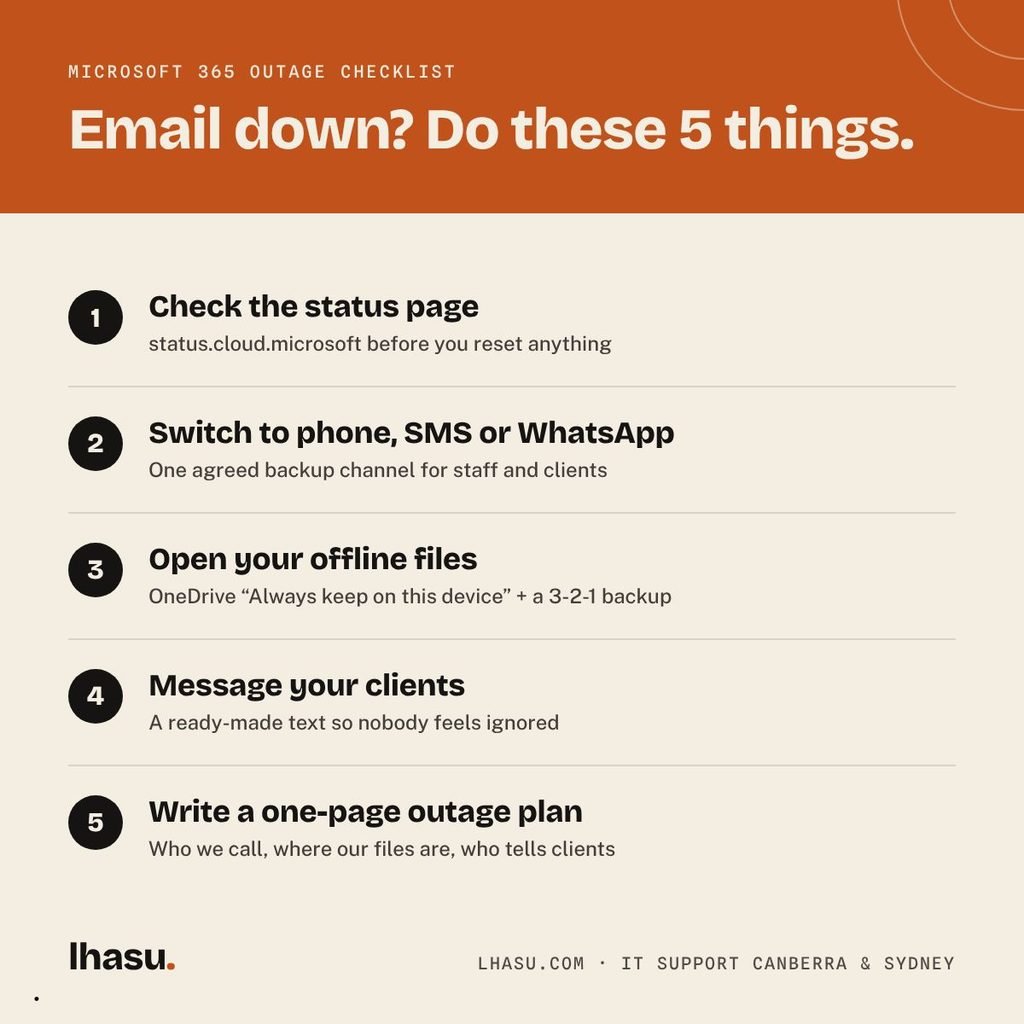
5 Ways to Keep Working During a Microsoft 365 Outage
1. Check the Official Status Page First
When you suspect a Microsoft 365 outage, don’t restart anything yet. First, check Microsoft’s service health status page. If Microsoft has posted a known issue, the problem isn’t on your side. That means resetting passwords or reinstalling Outlook won’t help. In fact, it can create new problems once the service comes back.
2. Switch to a Backup Contact Channel
Phone calls, SMS and WhatsApp run on completely different systems to Microsoft 365. So they keep working when Outlook and Teams don’t. Agree on one backup channel with your staff now, before you need it. For example, “if email is down, we use the team WhatsApp group.” That’s also why we always list a phone number and WhatsApp on our own site.
3. Keep Key Files Available Offline
If your quotes and invoices only live in SharePoint or OneDrive, a Microsoft 365 outage can lock you out of them. Fortunately, there are two easy fixes. First, in OneDrive, right-click the folders you use daily and choose “Always keep on this device.” Those files then open even without a connection. Second, keep a separate backup outside Microsoft. The simple 3-2-1 approach works well: three copies, on two types of storage, with one stored off-site.
4. Tell Clients Before They Start Wondering
A short text or call stops clients thinking you’re ignoring them. Keep a ready-to-send message, such as: “Our email is down due to a Microsoft 365 outage. Please call or text us on this number in the meantime.” It takes ten seconds to send. More importantly, it protects your reputation far better than an apology later.
5. Write a One-Page Outage Plan
You don’t need a 40-page business continuity document. Instead, answer three questions on one page. Who do we call? Where are our files? Who tells our clients? Then pin it somewhere everyone can find it offline. Also, note how long this week’s Microsoft 365 outage held you up and what it cost you. Next time, you’ll know exactly what to fix first.
Should You Leave Microsoft 365 After This Outage?
Probably not. Every major cloud provider has outages, Google and Amazon included. Moving providers after one bad morning swaps a few hours of disruption for weeks of migration work. The better goal is simple: don’t depend on any single service for everything.
The same idea runs through our guide on what to do in the first hour after a remote-access scam. A bad IT day is far easier to handle when you’ve already decided your next step.
Need Help Getting Outage-Ready?
If Friday morning was chaos, that’s worth a short conversation. Our IT support for Canberra small businesses includes setting up offline file access, backup channels and simple outage plans. Not sure what kind of support suits you? Our guide to fixed-quote vs subscription IT support walks through the options honestly.
We offer a free, no-obligation chat, with no pressure either way. Reach us through our contact page, or read more about how we work first.
Frequently Asked Questions
When did the Microsoft 365 outage happen?
It started on Thursday 12 November 2026, US time. In Canberra, that was early Friday 13 November. Problem reports peaked around 5am Canberra time, and some users had Outlook back by about 9am.
What caused the Microsoft 365 outage?
Microsoft said part of its infrastructure was under elevated load across multiple regions. Many servers went offline unexpectedly and failed health checks, which pushed extra load onto the remaining servers.
Which Microsoft services were affected?
Outlook and Exchange Online were hit hardest. Microsoft also listed Teams, SharePoint Online, Microsoft 365 Copilot and Defender XDR. Some users also reported trouble with OneDrive.
How do I check if Microsoft 365 is down?
Check Microsoft’s official service health page at status.cloud.microsoft. If it shows a known issue, the problem is on Microsoft’s side, so there’s no need to reset passwords or reinstall apps.
Should my business switch away from Microsoft 365?
Not because of one outage. Every major cloud provider has them. Instead, set up a backup contact channel and keep offline copies of your most important files.
How can a small business prepare for the next outage?
Agree on a backup contact channel, such as phone or WhatsApp. Keep key files available offline. Then write a one-page plan covering who to call, where files are and who tells clients.
Written by the Lhasu team.
Leave a Reply